
Unlock Liferay's Integration Potential with N8N: A Practical Guide to Workflow Automation
Discover how to transform Liferay into an integration powerhouse using N8N workflow automation. This article shows how to connect Liferay with any business system through automated workflows, saving hours of manual work. Learn from a real-world HubSpot integration example that demonstrates the power of combining Liferay Objects with visual automation tools.
Why N8N + Liferay is a Game Changer
If you've worked with Liferay for any length of time, you know it's a powerful platform packed with features for content management, digital commerce, custom application development, and even some integrations like Salesforce or payment gateways. Still Liferay is not and will never be a proxy to hundreds of business applications like N8N which specializes exactly in that.
Few words on N8N: it is a workflow automation platform that allows you to connect different apps and services to create automated workflows without extensive coding knowledge. It provides a visual, node-based interface where you can drag and drop integrations to build complex automations. N8N supports hundreds of integrations and can be used as an SaaS solution or deployed on your own infrastructure, giving you full control over your data and workflows. Even though it can be used without code knowledge it also gives you possibility to write custom code when needed.
What makes this combination particularly useful is Liferay's recent addition of Objects and Actions. Objects allow you to create custom data structures without coding, while Actions can trigger external applications when specific events occur with things called "Webhooks". For example, when a new partner application is approved, an order status changes, or a document gets published. This means you can now trigger complex, multi-step workflows across your entire tech stack directly from Liferay events, all without writing a single line of integration code.
The best part? Unlike traditional point-to-point integrations that become maintenance nightmares, N8N provides a visual, maintainable way to orchestrate these workflows. Your business users can actually see and understand the flow of data between systems.
Note on Tools: While this article uses N8N as workflow automation platform, the concepts and patterns we'll discuss apply equally well to other automation tools like Make or Zapier.
Why not to create integrations manually?
Even though solutions like N8N or Make seem nice and easy to use you might still ask yourself: "Why would I want to use external tool and not just create integration as custom code in Liferay? Or hire someone to do it for me?". The answer is simple: you could. In fact, I myself like to create custom integrations code. Even more than creating custom integrations for myself I like to do that for clients - in the end this is what we do for a living in InnRay.
Additionally: custom integrations are fun to do but reality shows that it's not always the best option. Lets think about the process of creating a custom integration:
- You need to write the code.
- You need to maintain the code.
- You need to test the code.
- You need to deploy the code.
- You need to monitor the code.
- You need to document the code.
All of these just to create integration to a single system. And the worst thing is that APIs are not always stable. One day it might work, the second it might not. Or maybe you will even get notified beforehand but then you need to switch to updating your custom code instead of working on expanding your (or your client's) business in things that actually matter.
Is N8N answer to all integrations? Of course not! N8N is just one of many tools that can help you automate your business. It is just worth considering, especially for integrations with well-known and popular systems.
On the other hand there are still so many systems that N8N does not support, or supports poorly (for example by providing very limited capabilities): in this case custom integration is still the best option.
Real-World Example: Automating Partner Onboarding
To illustrate the power of this approach, let's look at a recent project where I helped a client automate their partner onboarding process. Like many B2B companies, they had a complex, manual workflow for accepting and onboarding new partners. The process involved multiple steps: application review, approval workflows, syncing approved partner data across multiple systems, and many more.
The entire automation project saves the sales team hours of manual work each month, but for this article, we'll zoom in on one specific integration that showcases the Liferay + N8N pattern beautifully: automatically syncing approved partners to HubSpot.
Here's the challenge this particular step solved: When a partner application was approved in Liferay, someone had to manually check if that company already existed in HubSpot as a lead. If it did, they'd update the status to "customer" and enrich the record with registration data. If not, they'd create both a new company and contact record. This manual process was not only time-consuming but prone to errors.
By connecting Liferay Objects (storing partner applications) with HubSpot through N8N, we transformed this multi-step manual process into an instant, automatic workflow. The moment a partner application is approved in Liferay, the entire HubSpot sync happens automatically - checking for existing records, making decisions about updates versus creation, and ensuring data consistency across both platforms.
Building the Integration Flow
Let's walk through how this integration actually works. The beauty of this approach is that once you understand the pattern, you can apply it to virtually any integration scenario.
This section will cover some technical aspects, if you are only interested in the business perspective: skip down to the next section.
Designing the N8N Workflow
In N8N, the workflow starts with a Webhook node that receives data from Liferay. From there, the real orchestration begins:
- Check Existing Records: Using HubSpot's search API, we check if a company with the same tax ID or domain already exists. This is crucial for preventing duplicates.
- Decision Logic: Based on the search results, the workflow branches:
- If the company exists → Update it to "Customer" status and enrich with new data
- If it's new → Create both company and contact records
- Error Handling: We added error notifications via email if any step fails, ensuring nothing falls through the cracks.
The entire workflow is visual and self-documenting. Anyone on the team can look at the N8N canvas and understand exactly what happens when a partner is approved.
The overview of the process looks like this:
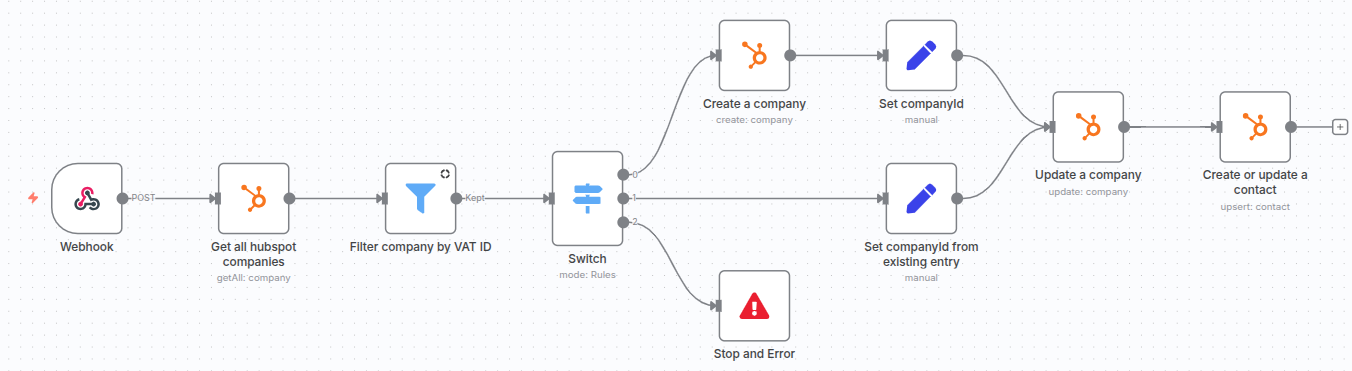 There are some technical details like we need to get all companies from hubspot and then filter them (due to API
limitations), but the overall flow should be clear.
There are some technical details like we need to get all companies from hubspot and then filter them (due to API
limitations), but the overall flow should be clear.
We, of course, would also need to authenticate N8N with HubSpot but we won't cover this in this article as HubSpot integration is meant to be just an example of Liferay and N8N integration. Another thing is error handling: many things can go wrong and you need strategy to handle these cases.
Setting up N8N Webhook
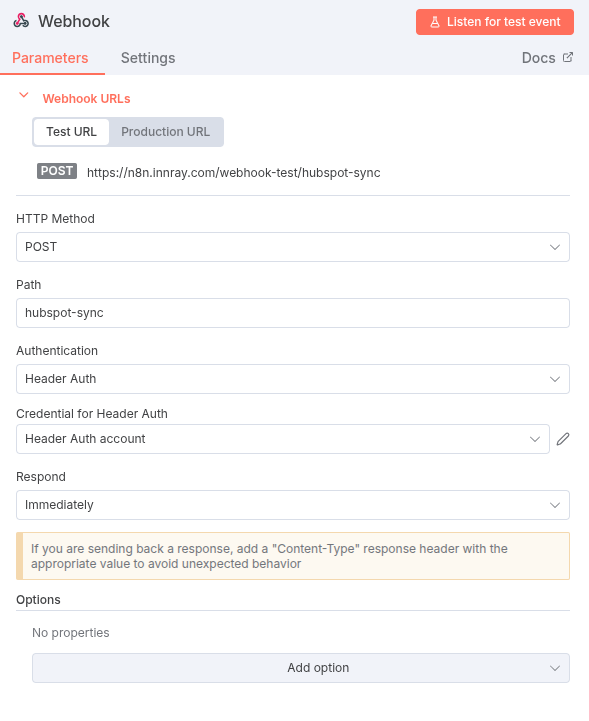
As mentioned in the previous section, the first step in the workflow is a Webhook node that receives data from Liferay. The configuration for this node is straightforward:
- Use POST HTTP Method
- Use Header Auth as authentication method
- Once we pick Header Auth we then need to configure "Credential for Header Auth" field - we need to create new credentials with name x-api-key and value should be password(/key) you want to use for authentication.
There are also some other options (for example setting nicer path than the default GUID) but these are the most important.
The overview of the configuration looks like this:
Setting Up the Liferay Trigger
Next, we need Liferay to notify N8N when a partner application is approved. In case you are using objects (which are really recommended these days) you can do so by setting up an Object Action. Object actions are basically actions that can be triggered manually or automatically based on certain events like object creation, deletion, or modification.
Going back to our example, we had a custom object with fields like company name, tax ID, contact email, and many more.
We also had field "Sync Status" which changed based on other actions and was related
to sync to other systems before HubSpot. What we wanted to achieve now is to call N8N flow whenever "Sync Status"
changed to "Success".
To do so in the Actions tab we configured action like this:
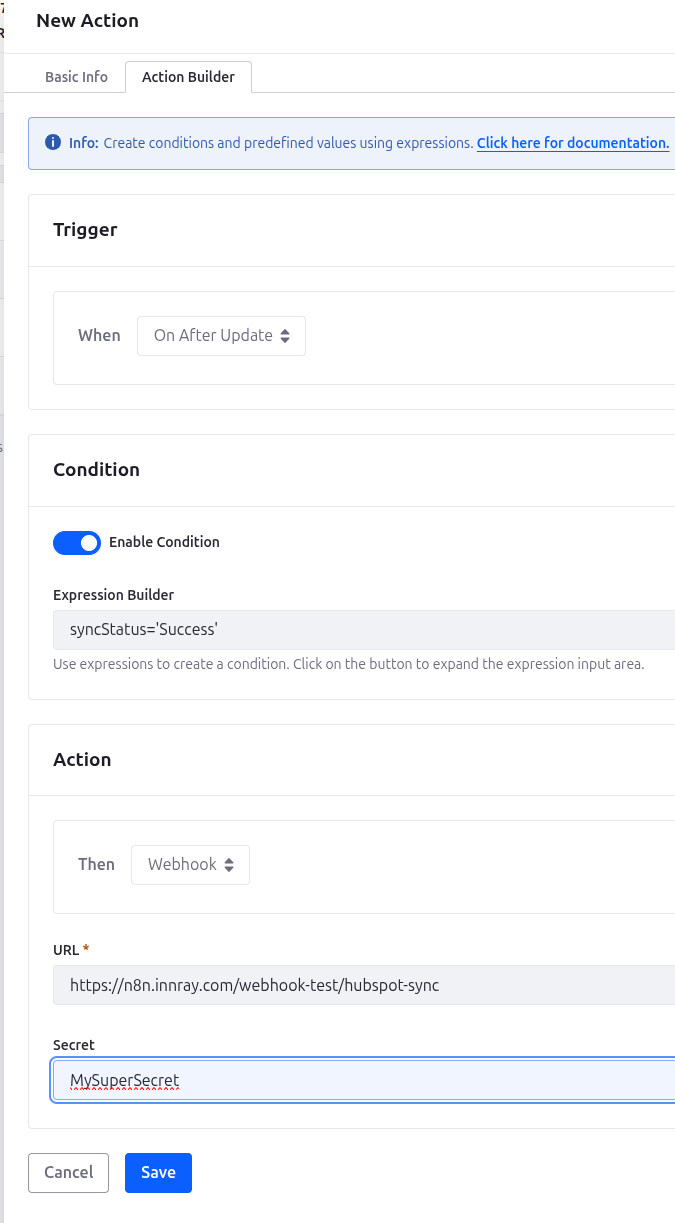 Please note custom condition used for observing specific field.
This way whenever a partner application was approved and other conditions were met, N8N flow was triggered.
Results
Even though this flow is straightforward, it's the one I see as actually great example for a few reasons:
- It does not require any deep technical knowledge - flows with 20, 30, or even 100 nodes are nice to look at but not that easy to create in a maintainable way
- It was simple to implement and yet for each application around ten minutes are saved
- In addition to time saved it also reduces the errors by manually filling data in HubSpot: for dozens of fields to be filled it makes a difference
- It not only saves times and reduces errors but also makes life nicer: who wants to do such repetitive tasks each day?
Beyond This Example: What Else is Possible
While our HubSpot integration showcases one use case, the real magic of combining Liferay with N8N lies in the endless integration possibilities this pattern unlocks.
Think about the repetitive tasks your team handles daily. With Liferay Objects and N8N, you could:
- Multi-System Order Management: When an order is placed in Liferay Commerce, automatically create entries in your ERP, update inventory systems, and trigger fulfillment workflows
- Customer Data Synchronization: Keep customer data synchronized across Liferay, your CRM, email marketing platform, and support desk
- Invoice Generation: When certain conditions are met in Liferay (approved order, completed service), automatically generate and send invoices through external accounting systems
- AI-Powered Content Enhancement: Send content created in Liferay to AI services for automatic tagging, SEO optimization, or translation, then update the content with enriched metadata
- Reporting and Analytics: Automatically push Liferay data to business intelligence tools, Google Sheets, or create custom dashboards
Different Trigger Points from Liferay
Objects Actions are just one way to trigger N8N workflows. You can also:
- Set up scheduled tasks to batch process data
- Watch for file uploads or content changes
- React to user actions like form submissions or account creations Trigger workflows based on commerce events like cart abandonment or payment completion
The Power of Visual Workflows
What makes N8N particularly valuable is how it democratizes integration development. Business analysts can understand and even modify workflows without deep technical knowledge. When requirements change - and they always do - updating a visual workflow is far simpler than rewriting custom integration code.
Getting Started with Your Own Integrations
Ready to start building your own Liferay + N8N integrations? Here are the key considerations to ensure success:
Key Considerations:
- Start Small: Begin with a simple, high-value integration - perhaps syncing form submissions to your CRM or automating report generation. Once you've proven the concept, expand to more complex workflows.
- Data Mapping: Before building, document how data fields map between systems. What's called "company_name" in Liferay might be "organization" in your CRM. Clear mapping prevents confusion later.
- Error Handling: Always plan for failures. What happens if HubSpot is down? If data is malformed? Build in appropriate error notifications and retry logic from the start.
- Security: Ensure your webhooks are secured with authentication tokens and use HTTPS endpoints. If self-hosting N8N, follow security best practices for your infrastructure.
Best Practices
- Version Control: Export and version your N8N workflows regularly. This makes rollbacks easy if something goes wrong.
- Documentation: Document not just what the workflow does, but why business decisions were made. This helps immensely during future modifications.
- Testing: Create test Objects in Liferay for safe workflow testing before going live with production data.
- Monitoring: Set up alerts for failed workflows and regularly review execution logs to catch issues early.
Next Steps
- Explore Liferay's Objects and Actions documentation to understand the full capabilities
- Set up an N8N instance (or try their cloud version for quick experimentation)
- Identify your most painful manual integration task
- Build a proof of concept and iterate from there
Conclusion: Transform Your Liferay Integration Strategy
The combination of Liferay and N8N represents a paradigm shift in how we approach system integrations. Instead of costly custom development or error-prone manual processes, you can now build visual, maintainable workflows that connect Liferay to virtually any business system.
Our HubSpot integration example - while saving just ten minutes per application - demonstrates the broader potential. When you multiply similar automations across different departments and processes, the impact on efficiency and accuracy becomes transformative. More importantly, it frees your team from repetitive tasks to focus on what truly matters: growing your business.
Whether you're looking to sync data between systems, automate complex business processes, or eliminate manual data entry, the Liferay + N8N pattern provides a scalable, maintainable solution that business users can actually understand and modify.
Need Help Getting Started?
At InnRay, we specialize in Liferay implementations and we also have worked on plenty of integrations - both with tools like N8N and with custom code.
Whether you need help setting up your first N8N workflow, designing complex multi-system integrations, or building custom solutions when out of the box tools aren't enough, our team is here to help. We've successfully automated countless business processes for our clients, and we'd be happy to help transform your integration challenges into automated solutions.
Contact us to discuss how we can help streamline your business processes with intelligent integrations or check out our AI & Automation Services page for more information.